
Blog
What Is Picuki? How It Works and How to Use It in 2026


Picuki is a free online tool known for viewing public Instagram content without logging in. It became popular for browsing profiles, photos, stories, and videos. Some versions also offer downloads and basic photo editing tools.
The original Picuki website no longer works as an Instagram viewer in 2026. Other websites still use its name and offer similar features. This article covers how these tools work, their main features, safety risks, and alternatives.
What Is Picuki?
Picuki is a third-party Instagram viewer. It lets users browse public profiles, photos, and posts through a web browser. The original service also offered photo editing and download tools.
People used it to view Instagram content without an account. They could search for public profiles, view photos, and find posts from brands and creators. The search tool was simple to use.
The original Picuki.com website no longer offers its old Instagram service. In October 2026, the domain redirected to Tikvib, a website for TikTok content. Other sites, such as Picuki.site and Picuki.to, still offer Instagram viewing tools. Their links to the original service are not confirmed.
How Does Picuki Work?
Picuki finds and displays content from public Instagram accounts. Users enter a username in the search box. The website then tries to load the profile and its public posts.
Some third-party viewers use their own servers to get public Instagram content. This lets people browse without using their own Instagram accounts. The content appears on the viewer’s website.
However, not every post may appear. Instagram can limit access or change how its website works. Some photos, videos, or stories may fail to load.
Key Features of Picuki
Picuki is known for public Instagram profile viewing. Users can search for accounts and view available posts without logging in. Some versions also support stories, reels, highlights, and profile pictures.
Some websites offer photo and video downloads. Users may be able to save public images, reels, and other posts to their devices. The file quality depends on the website and the content.
Certain versions also offer basic photo editing tools. These may include cropping, filters, and image changes. Most sites offer free access without registration, but features vary.
How to Use Picuki to View Instagram Profiles?
Open a supported website, such as Picuki.site, in your browser. Find the search box and enter the Instagram username you want to view. You do not need to enter your own Instagram login details.
The website may show the matching public profile. Open it to see available photos, videos, and posts. Some versions also have options for stories, reels, and highlights.
If the profile does not appear, check the username. The account may have changed its name, become private, or been deleted. The website may also have a loading problem.
How to View Instagram Stories Anonymously With Picuki?
Some versions of Picuki offer anonymous Instagram story viewing. Users can search for a public account and open its available stories without signing into Instagram.
To use this feature, open a supported viewer and enter the account’s username. If stories are available, select one to view it. Some websites also offer story downloads.
Anonymous viewing is not fully guaranteed. The website may collect browsing data, and its features may change. These tools also cannot normally show private stories or content shared only with Close Friends.
How to Download Instagram Photos and Videos With Picuki?
Some Picuki websites let users download public Instagram photos and videos. Search for a public profile and open the content you want to save. If downloads are supported, a download button may appear.
Click the button to save the file. On a computer, it may go to the Downloads folder. On a phone, it may appear in the gallery or file manager. The save location depends on the device and browser.
Some versions also support reels and posts with several photos. However, original file quality is not always available. Public Instagram content may still be protected by copyright. Ask the creator before using their work elsewhere.
Can You View Instagram Reels and Highlights on Picuki?
Some third-party viewers let users watch public Instagram reels without logging in. Users can search for an account and open the available videos.
Instagram highlights are saved collections of past stories. Account owners can keep these stories on their profiles after the normal story period ends. Some versions of Picuki support public highlights.
However, reels and highlights may not always load. This can happen because of website errors or changes to Instagram. Private and deleted content is not normally available through these tools.
Does Picuki Have Photo Editing Features?
The original Picuki service offered basic photo editing tools. Users could crop photos, add filters, and make simple changes before saving them.
Some newer websites using the name also advertise editing features. These may include cropping, rotating, adding text, and changing colors. Users can save edited photos when the tools are available.
Not every website supports photo editing. Some only offer viewing and downloading. Editing someone else’s photo also does not give users ownership of the image.
Is Picuki Free and Safe to Use?
Websites such as Picuki.site and Picuki.to advertise free Instagram viewing. Some also offer downloads without payment or registration. However, their features and rules may change.
Third-party viewers can have safety risks. Some show ads, pop-ups, and links to other websites. They may also use cookies or collect browsing data. Anonymous viewing does not mean complete privacy.
Never enter your Instagram password on an unknown website. Avoid strange downloads, browser extensions, and requests for personal details. Check the website address before using any third-party tool.
Can Picuki View Private Instagram Accounts?
Picuki cannot normally view private Instagram accounts. Instagram lets account owners choose who can see their posts and stories. Only approved followers can access private content.
A third-party viewer cannot simply open private photos, videos, or highlights. It may show limited public details, but private posts remain hidden.
Some websites claim they can unlock private Instagram profiles. These claims should not be trusted. The proper way to see private content is to send a follow request and wait for approval.
Why Is Picuki Not Working?
Picuki may stop working because of server errors, website changes, or limits on Instagram access. Users may see blank pages, missing profiles, or broken download buttons.
The original Picuki.com website also changed. In October 2026, it redirected to Tikvib instead of opening its old Instagram viewer. Other websites still use the Picuki name, but their links to the original service are not confirmed.
If a viewer fails, check the username and refresh the page. You can also try another browser or wait before trying again. If the problem continues, check the public profile through Instagram.
Best Picuki Alternatives for Instagram Viewing
Several websites offer tools similar to Picuki. StoriesIG focuses on public Instagram stories. GramSnap offers viewing and download features. Other known names include Imginn, Dumpor, and AnonyIG.
These websites offer different tools. Some focus on stories, while others support photos, reels, or profile pictures. Their features and reliability may change over time.
Choose a website that does not ask for your Instagram password. Avoid services that claim to unlock private accounts. For regular browsing, the official Instagram website is often more reliable.
Picuki vs Instagram: What Is the Difference?
Picuki and Instagram serve different purposes. Instagram is the official social media platform. Users can create accounts, share photos, post reels, and connect with others. Third-party viewers mainly display public content.
Instagram lets users follow accounts, like posts, comment, send messages, and share their own content. Third-party viewers do not normally offer these features. They focus on browsing public posts without logging in.
Instagram also gives users direct access to its features. Outside viewers may show missing content or stop working. People who want to post or interact with others need Instagram.
Bottom Line
Picuki became popular as a free tool for viewing public Instagram profiles without logging in. It offered photo viewing, downloads, and basic editing tools. Other websites now use the name and offer similar features.
The original Picuki.com website no longer provides its old Instagram service in 2026. Users should check which website they are visiting and avoid sharing personal details.
Third-party viewers can help people browse public posts, but they have limits. For more reliable access, the official Instagram website remains a good option.
FAQs
Is Picuki completely free to use?
Websites such as Picuki.site advertise free public Instagram viewing without registration or payment.
Can someone see if I view their Instagram story on Picuki?
Third-party viewers claim to hide your Instagram identity, but full anonymity is not guaranteed.
Do I need an Instagram account to use Picuki?
No, supported versions let users browse public Instagram content without logging in.
Can I download Instagram reels using Picuki?
Some versions offer reel downloads, but this depends on the website and available content.
Is Picuki available as a mobile app?
Some mobile apps use the Picuki name, but their link to the original website is not confirmed.
Read Also: SoSoActive: A Complete Guide to Its History, Topics, and Features

The inter miami vs tigres uanl timeline covers two Leagues Cup matches between the American and Mexican football clubs. Tigres won their first meeting 2-1 on August 3, 2024. Inter Miami then won 2-1 in the 2025 quarterfinal. Both games had late goals and close finishes.
On August 20, 2025, Luis Suárez scored two penalties for Inter Miami. Ángel Correa scored for Tigres, but Miami held on to win. The result sent Miami into the Leagues Cup semifinals.
Inter Miami vs Tigres UANL Timeline Overview
Inter Miami and Tigres UANL met twice in the Leagues Cup in 2024 and 2025. Their first match took place in the 2024 group stage. Tigres won 2-1 after scoring a late goal.
The teams met again on August 20, 2025, in the quarterfinals. Inter Miami won 2-1 with two penalty goals from Luis Suárez. Ángel Correa scored Tigres’ only goal.
Both teams had one win each after these matches. They also scored three goals each across the two games.
Inter Miami vs Tigres UANL Timeline: August 20, 2025
The 2025 Leagues Cup quarterfinal took place at Chase Stadium in Fort Lauderdale, Florida. Inter Miami played without Lionel Messi, who was out with an injury. Luis Suárez led Miami’s attack.
Telasco Segovia received a yellow card in the fourth minute. In the 23rd minute, Javier Aquino handled the ball inside the box. The referee gave Miami a penalty, and Suárez scored to make it 1-0.
Ángel Correa equalized for Tigres in the 67th minute after a pass from Juan Brunetta. Miami then won another penalty late in the game. Suárez scored in the 89th minute to give Miami a 2-1 win.
First-Half Highlights and Opening Goal
Both teams looked for an early goal, but neither scored in the opening 20 minutes. The first goal came after Javier Aquino handled the ball inside the penalty area.
Luis Suárez took the penalty in the 23rd minute. He scored to put Inter Miami ahead 1-0. Tigres tried to respond, but Miami kept its lead until halftime.
At halftime, Inter Miami coach Javier Mascherano was sent off after arguing with the officials. He watched the second half from the stands and used his phone to contact his staff.
Second-Half Action and Key Turning Points
Inter Miami made an early change in the second half. Noah Allen replaced the injured Jordi Alba in the 47th minute. In the 63rd minute, Benjamin Cremaschi replaced Telasco Segovia. Marcelo Weigandt also came on for the injured Ian Fray.
Tigres equalized in the 67th minute. Juan Brunetta passed the ball to Ángel Correa, who scored to make it 1-1. Both teams then pushed for another goal.
In the 87th minute, Juan Brunetta and Rodrigo De Paul received yellow cards. Soon after, Javier Aquino handled the ball inside the box again. Miami received another penalty, and Suárez scored the winning goal.
Inter Miami vs Tigres UANL Timeline: Goals and Scorers
Three goals were scored in the August 2025 quarterfinal. Luis Suárez scored twice for Inter Miami, while Ángel Correa scored once for Tigres.
Suárez opened the scoring with a penalty in the 23rd minute. Correa equalized in the 67th minute after a pass from Juan Brunetta. Suárez then scored another penalty in the 89th minute.
Both of Suárez’s goals came from penalty kicks. His second goal gave Inter Miami the 2-1 victory.
| Minute | Player | Team | Goal |
|---|---|---|---|
| 23′ | Luis Suárez | Inter Miami | Penalty, 1-0 |
| 67′ | Ángel Correa | Tigres UANL | Equalizer, 1-1 |
| 89′ | Luis Suárez | Inter Miami | Penalty, 2-1 |
Inter Miami vs Tigres UANL Timeline: Yellow Cards and Red Card
Telasco Segovia received the first yellow card in the fourth minute. The booking came early in the first half, before either team had scored.
At halftime, Inter Miami coach Javier Mascherano received a red card after arguing with the match officials. He had to leave the touchline and watch the rest of the game from the stands.
In the 87th minute, Tigres midfielder Juan Brunetta and Inter Miami midfielder Rodrigo De Paul both received yellow cards. These bookings came just before Miami’s winning penalty.
Inter Miami vs Tigres UANL Timeline: Injuries and Substitutions
Inter Miami lost two defenders to injuries during the match. Jordi Alba could not continue, so Noah Allen replaced him in the 47th minute.
Ian Fray also left the field due to injury. Marcelo Weigandt replaced him in the 63rd minute. At the same time, Benjamin Cremaschi came on for Telasco Segovia.
Tigres scored shortly after these changes. However, Inter Miami recovered and scored the winning goal in the 89th minute.
Lionel Messi’s Absence and Luis Suárez’s Performance
Lionel Messi missed the August 20, 2025, quarterfinal due to injury. Inter Miami had to face Tigres without its star forward.
Luis Suárez scored Miami’s first goal from the penalty spot in the 23rd minute. After Tigres equalized, he scored another penalty in the 89th minute.
His two goals helped Inter Miami beat Tigres 2-1 and reach the Leagues Cup semifinals.
Inter Miami vs Tigres UANL Timeline: August 4, 2024
Inter Miami and Tigres first met on August 3, 2024, at NRG Stadium in Houston, Texas. The match was part of the Leagues Cup group stage.
Juan Brunetta scored first for Tigres. Inter Miami equalized in the second half when Leonardo Campana scored from the penalty spot. His goal made the score 1-1.
Juan Pablo Vigón scored the winning goal for Tigres in the 84th minute. Tigres won 2-1 and finished first in the group. Inter Miami finished second, and both teams reached the knockout stage.
Inter Miami vs Tigres UANL Head-to-Head Record
Inter Miami and Tigres each won one of their first two Leagues Cup meetings. Tigres won 2-1 in August 2024, while Inter Miami won 2-1 in August 2025.
Both clubs scored three goals and conceded three across these matches. Neither team had a lead in the head-to-head record after the 2025 game.
| Match detail | Result |
|---|---|
| Matches played | 2 |
| Inter Miami wins | 1 |
| Tigres UANL wins | 1 |
| Draws | 0 |
| Inter Miami goals | 3 |
| Tigres UANL goals | 3 |
| First meeting | August 3, 2024 |
| Second meeting | August 20, 2025 |
The first match took place in the group stage. The second was a quarterfinal, where Inter Miami secured a place in the semifinals.
Inter Miami vs Tigres UANL Timeline: Final Minutes and Result
The final minutes of the 2025 quarterfinal were tense. After Ángel Correa equalized, both teams looked for a winning goal. Miami then received another penalty following Javier Aquino’s handball.
Luis Suárez scored in the 89th minute to put Miami ahead 2-1. Tigres brought on André-Pierre Gignac for Javier Aquino and pushed forward in search of an equalizer.
In stoppage time, Édgar Iván López headed the ball toward Miami’s goal. His shot struck both posts but did not go in. Inter Miami held on to win 2-1 and reached the semifinals, where they faced Orlando City.
Why the Inter Miami vs Tigres UANL Rivalry Matters?
Inter Miami plays in Major League Soccer (MLS), while Tigres UANL plays in Mexico’s Liga MX. Both leagues take part in the Leagues Cup.
The teams’ first two meetings ended with the same 2-1 score. Tigres won in 2024 through a late goal from Juan Pablo Vigón. Inter Miami won in 2025 after Luis Suárez scored a late penalty.
The 2025 match was a quarterfinal, so the winner moved on and the loser left the tournament. Miami’s victory also made the head-to-head record level.
Final Thoughts
The inter miami vs tigres uanl timeline covers two close Leagues Cup matches in 2024 and 2025. Tigres won the first game 2-1 in Houston. Inter Miami won the second by the same score in Fort Lauderdale.
The 2025 quarterfinal featured two penalties from Luis Suárez, an equalizer from Ángel Correa, and a red card for Javier Mascherano. Tigres nearly scored in stoppage time, but Miami held on.
After these two matches, both clubs had one win and three goals each.
FAQs
Who won Inter Miami vs Tigres UANL in 2025?
Inter Miami beat Tigres UANL 2-1 on August 20, 2025, in the Leagues Cup quarterfinals.
Who scored for Inter Miami against Tigres UANL?
Luis Suárez scored both goals for Inter Miami from penalties in the 23rd and 89th minutes.
Did Lionel Messi play against Tigres UANL in 2025?
No, Lionel Messi missed the August 20, 2025, match due to injury.
Who won the first Inter Miami vs Tigres UANL match?
Tigres UANL won 2-1 on August 3, 2024, at NRG Stadium in Houston.
What is the Inter Miami vs Tigres UANL head-to-head record?
After two Leagues Cup meetings through 2025, both teams had one win and three goals each.
Read Also: What Is GrammarVista.com USA? A Complete Guide to the Website

Allysplay.com is an independent gaming blog created by a group of gamers. The website shares game reviews, gaming news, tips, and helpful guides. It focuses on simple content based on gaming experiences and personal views. Readers can learn about games, new features, and gaming trends.
The platform also allows readers to share comments and feedback. It has a YouTube channel with short and long videos. This article covers its content, features, gaming community, and benefits for players in 2026.
What Is Allysplay.com?
Allysplay.com is a gaming website that shares reviews, news, guides, and tips about video games. It helps readers learn about games, understand new features, and improve their skills. The website covers different gaming topics in clear and simple language.
The platform works as both a gaming blog and a community space. New players can read guides to learn basic skills. Regular gamers can explore reviews, news, and updates about games that interest them.
The website also shares personal gaming views rather than only using official company news. This gives readers another way to learn about games and their features.
Who Created Allysplay.com?
Allysplay.com was created by a group of gamers who wanted to share their love of video games. According to its About page, the website focuses on gaming reviews, news, guides, and community content.
The team aims to share gaming information from a player’s point of view. Its articles focus on gaming topics, personal opinions, and useful advice rather than only repeating official game news.
The names of all team members and the website’s exact launch date are not confirmed in the provided details. The platform presents itself as an independent gaming blog made by gamers.
What Content Does Allysplay.com Offer?
The website shares different types of gaming content. Its main topics include game reviews, gaming news, helpful guides, tips, and industry trends. These articles help readers find useful gaming information in one place.
Game reviews explain what a game offers. News posts cover updates and new announcements. Guides help players learn controls, understand features, and solve common problems. Gaming tips also help readers improve their skills.
The platform covers wider gaming topics as well. Readers can explore changes in gaming, popular game styles, and new features. They can choose articles based on their interests and needs.
Game Reviews on Allysplay.com
Game reviews help players learn about a game before trying it. A useful review covers gameplay, graphics, controls, sound, and key features. It may also explain what makes a game fun or hard to play.
Allysplay.com includes game reviews in its content. These reviews give readers another view of different games. For example, a racing game review may discuss car controls and tracks. A story game review may focus on its plot and characters.
Game reviews often include personal opinions. One player may enjoy a game that another player finds difficult. Reading different reviews can help gamers make better choices.
Gaming News and Updates
Gaming news helps players learn about new games, updates, and changes in the industry. Game makers often release new features, fix problems, and announce future plans. News articles explain these updates to readers.
The platform shares gaming news and breakdowns. These posts help readers understand important announcements without reading long reports. They may explain what has changed in a game and why it matters to players.
Readers should check the date of each news article. Game updates and release plans can change over time. Official game websites are also useful for checking major announcements.
Gaming Tips and Guides on Allysplay.com
Gaming guides help players understand games and learn new skills. Some games have many controls, rules, and features. Clear guides can make these parts easier to learn.
Allysplay.com shares gaming tips and guides for its readers. These posts can help beginners understand basic controls and gameplay. Regular players can also use tips to improve their timing, planning, and skills.
For example, a guide may explain how to change game settings or complete a difficult task. Players should check that the guide matches their game version, as updates can change how some features work.
Gaming Trends Covered by Allysplay.com
Gaming trends show how games and player interests change over time. New technology, game styles, and online features can affect how people play. Some trends become popular for years, while others last for a short time.
Gaming trends are part of the website’s content. These topics can include popular game types, new features, and changes in player habits. For example, cross-platform play lets people using different devices play certain games together.
In 2026, people can enjoy games on computers, consoles, and mobile devices. Cloud gaming also offers another way to play certain games through online services. Articles about gaming trends help readers understand these changes.
How Allysplay.com Builds a Gaming Community?
A gaming community allows players to share opinions, tips, and experiences. People can discuss games, ask questions, and learn from other players. These discussions can add useful details to gaming articles.
Allysplay.com encourages readers to share comments and feedback. Visitors can discuss gaming topics and offer their views. For example, someone may share a helpful tip or explain a problem they faced while playing.
Reader feedback can also help writers understand which topics interest their audience. Questions and comments may show where readers need more help. This makes community discussions a useful part of a gaming blog.
Allysplay.com YouTube Channel
Allysplay.com has a connected YouTube channel called Allysplaycom. The channel features short and long videos. It gives viewers another way to explore gaming content beyond written articles.
Videos can help players understand game features and instructions. Watching something on screen may be easier than reading long steps. Short videos can explain quick ideas, while longer videos can cover topics in more detail.
Viewers can visit the channel to explore its videos and share feedback where comments are available. The channel’s latest videos and upload schedule can be checked directly on YouTube.
How to Use Allysplay.com
Visitors can start by opening the Allysplay.com homepage. They can explore gaming articles and choose topics that interest them. Reviews, news, and guides offer different types of information.
Readers looking for help with a game can start with a guide. Those interested in new games can explore reviews and news posts. It is useful to check article dates, as game updates may change features and controls.
Visitors can also read comments and share feedback where the website allows it. Those who prefer videos can explore the connected YouTube channel. The About page explains the website’s purpose and focus.
What Makes Allysplay.com Different?
Allysplay.com focuses on independent gaming content. It was created by gamers who wanted to share reviews, tips, and gaming news. The website aims to offer personal views rather than only repeating official company announcements.
The platform also connects written content with videos. Readers can explore blog posts, while viewers can visit its YouTube channel. This gives people different ways to learn about gaming topics.
Another feature is its focus on community feedback. Readers can share opinions and discuss gaming topics. However, personal reviews may differ, so checking other sources can help readers form their own views.
Is Allysplay.com Worth Visiting?
Allysplay.com may be useful for people who enjoy gaming blogs. It offers reviews, news, tips, and guides about video games. Beginners can explore guides, while regular players can read gaming updates and opinions.
The website also encourages community discussions. Readers can share feedback and learn from other players. Its YouTube channel offers another way to explore gaming content.
Before following advice from any gaming website, readers should check article dates and sources. Older guides may not match newer game versions. Reading official updates can also help confirm important details.
Final Thoughts
Allysplay.com is an independent gaming blog created by a group of gamers. It shares game reviews, gaming news, tips, guides, and gaming trends. Its content helps readers learn about different games and their features.
The website also encourages community discussions and feedback. Its connected YouTube channel offers short and long videos for people who prefer watching gaming content.
Players can explore the platform for gaming advice, reviews, and news. Checking article dates and official sources can help them find accurate and useful information.
FAQs
What is Allysplay.com?
Allysplay.com is an independent gaming blog that shares reviews, gaming news, tips, guides, and trends.
Who created Allysplay.com?
The website was created by a group of gamers who wanted to share gaming content and experiences.
Is Allysplay.com free to use?
Its blog articles are publicly accessible, but details about any paid services are not confirmed.
Does Allysplay.com have a YouTube channel?
Yes, the platform has a YouTube channel called Allysplaycom with short and long videos.
What content does Allysplay.com publish?
It publishes game reviews, gaming news, helpful guides, tips, and articles about gaming trends.
Read Also: What Is CracksTube? A Guide to Its Content and Publishing Platform
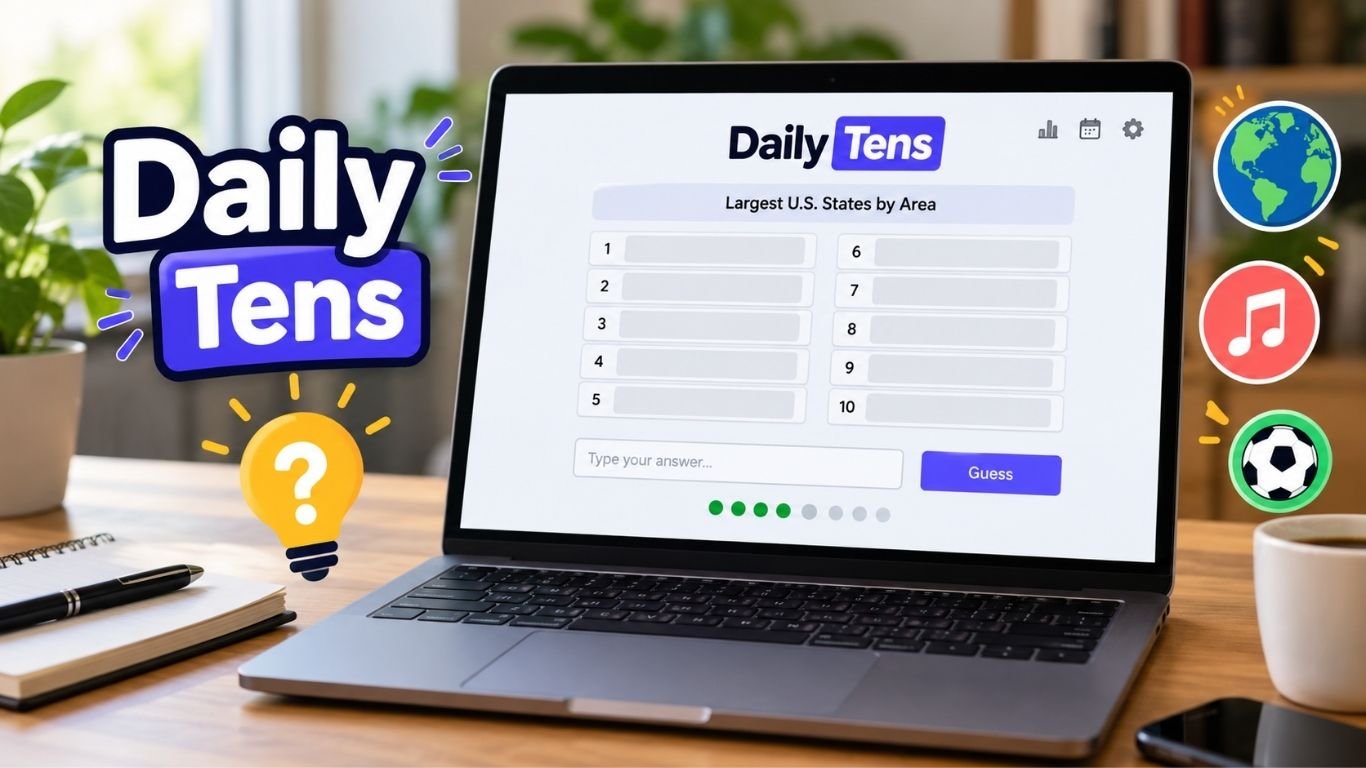
Daily Tens is a free online trivia game where players guess the top 10 answers in a ranked list. A new question appears each day. Players can enter answers in any order, but they must find all 10 before making five mistakes.
The game works on phones, tablets, and computers. It also has an archive of past puzzles. You can play without an account or sign in with Google to track your stats and streaks.
How Does Daily Tens Work?
The game gives players a new ranking question each day. Each question has a topic and a rule for ranking the answers. Players must find the 10 items that belong on the list.
You can enter answers in any order. If your guess is correct, it appears in its proper place. You do not need to start with the first-ranked answer.
Wrong guesses count toward your five-mistake limit. The round ends when you find all 10 answers or make five mistakes.
Daily Tens Rules and Mistake Limit
The main rule is to find the top 10 answers before making five mistakes. Each correct guess fills one place on the list.
For example, if the question asks for the largest US states, you could enter Texas first. If it belongs on the list, the game places it in the correct rank.
Each wrong guess adds to your mistake count. Once you make five mistakes, the round ends. You can also finish by finding all 10 correct answers.
How to Play Daily Tens Step by Step?
Visit the official website at DailyTens.com. The game runs in your browser, so no download is needed. Open the daily puzzle and read the question.
Think of an answer that fits the topic. Type it into the answer box and submit it. If the answer is correct, it fills its place in the list.
Keep guessing until you find all 10 answers or make five mistakes. You can also visit the archive to try puzzles from earlier days.
Daily Tens Questions and Categories
The game uses ranked lists from different subjects. Questions may cover geography, music, sports, history, and general knowledge.
A geography question might ask for the largest US states. A music question could focus on the most-streamed songs. Sports questions may cover records or top players.
Each question has a ranking rule. For example, the largest countries by area are not the same as the countries with the most people. Reading the full question helps you choose the right answers.
Daily Tens Daily Challenges
A new puzzle appears every day. Each one has a category and a top-10 list to complete. Some questions may be easier than others, based on what you know.
The daily format gives players a fresh question to solve. You can test your knowledge and return the next day for another challenge.
You can finish a round in a short play session. If you want more questions, the archive lets you try older puzzles.
Daily Tens Archive and Previous Games
The archive stores puzzles from past days. It lets you play older challenges if you missed them or want more practice.
Past questions cover different subjects. You might try a geography puzzle, followed by one about music or sports.
The archive also helps you learn new facts. You can practice topics you find hard and test your knowledge with more top-10 lists.
Daily Tens Features and Game Experience
The game has a simple layout and clear rules. You read a question, type your answers, and try to complete the top 10 list. Correct guesses appear in their ranked places.
The five-mistake limit makes each guess important. Random answers can end your round early, so it helps to think before you submit a guess.
The website also offers daily puzzles, past challenges, and optional Google sign-in. Signed-in players can track their stats and streaks.
Is Daily Tens Free to Play?
Yes, the game is free to play on its official website. You do not need to pay a subscription to access the basic daily challenge.
You can start playing without creating an account. Open the website, choose the daily puzzle, and enter your answers.
The website also has an archive of past games. Players who want to track their progress can use the optional Google sign-in feature.
Can You Play Daily Tens on Mobile and Desktop?
You can play the game on a phone, tablet, laptop, or desktop computer. It works through a web browser, so you do not need to install an app.
On a phone, you can type answers using the screen keyboard. On a computer, you can use a normal keyboard. The rules are the same on both devices.
You need an internet connection and a working browser. You can also open the archive on your device to play past puzzles.
Daily Tens Login, Stats, and Streaks
You do not need an account to play the daily puzzle. Guest access lets you start without signing up.
The website also supports optional Google sign-in. This lets players save their game stats and track their streaks.
Stats help players follow their results over time. Streaks show their record of regular play. Both features are optional.
Best Tips to Improve at Daily Tens
Read the full question before entering an answer. Check how the items are ranked. A question about the largest cities by area is different from one about the largest cities by population.
Start with answers you know well. Avoid random guesses because you only get five mistakes. Think about the topic before choosing your next answer.
You can also break a topic into smaller groups. For a sports question, think of well-known players or teams first. This may help you recall more answers.
Use the archive for practice. Try different subjects and focus on topics you find hard. This can help you build your general knowledge.
Daily Tens vs Wordle and Connections
Daily Tens, Wordle, and Connections are daily puzzle games. However, each game has different rules.
In Wordle, players must find a hidden five-letter word in six tries. The game gives clues about correct letters and their positions.
In Connections, players sort 16 words into four groups. Each group has four words that share a link.
Daily Tens focuses on ranked trivia lists instead of word puzzles. Players must recall facts and find the top 10 answers in a category.
Daily Tens vs Topmarks Daily 10
Daily Tens and Topmarks Daily 10 are two different games. Their names sound alike, but they have different goals.
Daily Tens is a trivia game where players guess items in ranked lists. Questions cover general knowledge topics such as geography, music, and sports.
Topmarks Daily 10 is a mental math game for children. It helps students practice addition, subtraction, multiplication, and division.
The main difference is the subject. Daily Tens tests general knowledge, while Topmarks Daily 10 helps children improve their math skills.
Final Thoughts
Daily Tens is a free online trivia game with a new top-10 challenge each day. Players must find all 10 answers before making five mistakes.
The game works on phones, tablets, and computers. It also offers past puzzles through its archive. You can play without an account or sign in with Google to track your stats and streaks.
Visit DailyTens.com to try the latest puzzle or practice with older challenges.
FAQs
What is Daily Tens?
Daily Tens is a free online trivia game where players guess the top 10 answers in a ranked category.
How many mistakes are allowed in Daily Tens?
Players can make up to five wrong guesses before the round ends.
Is Daily Tens free to play?
Yes, the game is free to play at DailyTens.com.
Can you play old Daily Tens puzzles?
Yes, the website has an archive where players can access past puzzles.
Do you need an account to play Daily Tens?
No, an account is not required, but Google sign-in lets you track stats and streaks.
Read Also: What Is Viprow.us.com? Sports News and Website Features

Inter Miami vs Tigres UANL Timeline: 2024 and 2025 Leagues Cup Matches

What Is Allysplay.com? Features, Content, and Gaming Community

Daily Tens Game Guide: Daily Trivia and Top 10 Puzzles

Alexandra Hollywood: The Full Story of Paul Hollywood’s Ex Wife

Who Is Lucy Aston? The Real Story of Martin Clunes’ First Wife

Who is Kim Howard? The Life of Kami Cotler’s Husband
-
Celebrities3 months ago
Alexandra Hollywood: The Full Story of Paul Hollywood’s Ex Wife
-
Celebrities3 months ago
Who Is Lucy Aston? The Real Story of Martin Clunes’ First Wife
-
Celebrities3 months ago
Who is Kim Howard? The Life of Kami Cotler’s Husband
-
 Celebrities3 months ago
Who Was Carol Elaine Jones? Ben Johnson’s Wife, Family, and Life Story
-
 Celebrities3 months ago
Who Is Thomas Daffron? The Full Story of Susan Collins’ Husband
-
 Celebrities3 months ago
Who Is Eleasha Hamed? All About Naseem Hamed’s Wife
-
 Celebrities3 months ago
Who Is Elen Rivas? Meet Frank Lampard’s Former Fiancée
-
 Celebrities3 months ago
Vanya Seager: True Story of Robson Green’s Ex Wife